
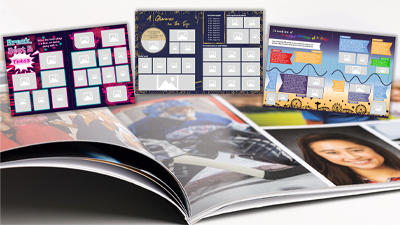
So it’s official, you’re part of the yearbook committee! You have no idea where to start. The graduate pages are obvious – but what about the rest? You can look at last year’s yearbook for inspiration, but how do you make this one special?
Luckily, your school probably organizes tons of activities throughout the year. So why not take advantage of that to fill your yearbook with authentic memories by:
• taking pictures (link to your photo blog);
• designing pages around these moments.
Right now, you might be staring at dozens of images, unsure how to choose or showcase them. Where should you begin?
- Prioritize Quality Over Quantity
Yes, it’s tempting to include photos of everyone. But remember: in a printed yearbook, you can’t zoom in on tiny pictures. Why should you focus on quality instead of quantity?
– Tiny pictures are hard to appreciate.
– In a few years, you won’t be able to recognize the people in them.
– A page that’s too crowded loses visual impact and becomes confusing.
– You won’t have space left for captions, names, dates, or anecdotes.
 Remember: a great yearbook doesn’t show everything – it shows the best.
- Highlight the Best Pictures
Good pictures tell a story:
– A clear emotion
– A meaningful moment
– Strong composition
– Interesting action
– A memory everyone will recognize
It’s better to feature a few well-presented images than 20 tiny ones scattered across the page.
When images have room to breathe, the eye can better enjoy the memory, and the layout instantly looks more polished.
- Leave Space for Text
Whether it’s:
– People’s names
– A description of an activity
– A funny moment from the year
the text is part of the story. If your page is saturated with images, you won’t have space to add those small but meaningful details that give context to the visuals.
The layout below clearly shows what happens when there are too many photos:

Ready-to-Use Templates… Such an Easy Solution!
Did you know that Laurentien offers tons of ready-to-use templates to help you design your yearbook? In Boogie, take a look in the “Laurentien Templates” section. You’ll find a variety of templates in the Theme Days category, such as:
- Christmas
- Halloween
- Movember
- Winter days
- Pyjama day
- “Everything but the backpack”
- Sports activities or other special school events
And even more serious themes like:
- Black History Month
- National Day for Truth and Reconciliation
- Earth Day
- And more
No matter what activities your school organized during the year, there’s probably a perfect template already available!
There are also other interesting template categories to explore, such as Quotes, Tribute, Social Media, Retrospectives, and Polls.
An Optimized and Easy-to-Customize Layout
Each template suggests an optimal number of photos to ensure the final result looks clean, balanced, and professional.
You’ll also find:
- pre-written text that you can adapt to your style,
- well-placed title areas,
- a visual structure that naturally highlights your photos.
Want to personalize your yearbook even more? No problem! You can easily change the background, adjust the colours, or modify certain elements so everything matches the overall style of your album.
Creating a graduation yearbook isn’t just about gathering photos – it’s about telling your story: your year, your highlights, your shared experiences. With these tips, themed templates, and all the ideas available to you and your committee, you now have everything you need to build a memorable yearbook – one that will make everyone proud today… and even more in the years to come.
Audrey Larocque – Graphic Design Project Manager